How can we help you?
- General information
- Installation and launch
- Interface overview
- Screen elements
- Command menu
- Main menu
- Toolbar
- Change display mode
- Hide or display tool group titles
- Hide or display the content of tool groups
- Customize the Favorites tool group
- Add an element
- Change a button to run a macro
- Move an element
- Remove an element
- Clear the Favorites group
- Hide or display the Favorites group
- Quick actions pane
- Workspace
- Sidebars
- Status bar
- Language
- Theme
- Files
- New file
- Save as template
- New from template
- Open a file
- Recent files
- Send a file via email
- Preview and print
- Save a file
- Autorecovery of documents
- Close a file
- Text
- Enter text
- Special characters
- Current date or time
- Spelling and grammar
- Correct spelling mistakes
- Add a word to the dictionary
- Import of third-party dictionaries
- Remove a word from the dictionary
- Find and replace data
- Move text
- Delete text
- Format
- Text styles and numbered headings
- Open the Styles pane
- Apply a style
- Create a style
- Edit a style
- Heading numbering
- Enable or disable heading numbering
- Set up template-based numbering
- Change heading numbering
- Limitations
- Delete a style
- Non-printable characters
- Font
- Font size
- Text formatting
- Text color
- Choose a color from the color sets provided
- Specify the color code manually
- Specify the color code manually
- Highlight color
- Alignment and spacing
- Horizontal alignment
- Vertical alignment
- Line spacing
- Character spacing
- Paragraph spacing and indents
- Rotate text
- Lists
- Create a list
- Change the list style
- Continue the numbered list
- Start a new numbered list
- Set the start number of the numbered list
- Change the number format
- Change the bullet format
- Format a number or bullet character
- Customize indents
- Change the nesting level
- Copy and paste a list
- Convert a list to text
- Copy and paste formatting
- Clear custom formatting
- References and links
- Table of contents
- Insert table of contents
- Add a level of table of contents
- Change the heading style for the table of contents level
- Delete a level of the table of contents
- Hide or display page numbers
- Format the table of contents
- Delete table of contents
- Links
- Insert a link to a web page or email address
- Insert a link to a file
- Quick link insertion
- Follow the link
- Copy a link
- Edit a link
- Delete a link
- Keyboard shortcuts
- Cross-references
- Footnotes
- Insert a footnote
- Navigate to a footnote
- Copy, cut and paste a footnote
- Edit and format a footnote
- Delete a footnote
- Bookmarks
- Tables
- Insert a table
- Insert a nested table
- Paste a table as an image
- Insert rows
- Insert columns
- Edit table content
- Select cells
- Select a column or row
- Select a table
- Cell fill color
- Add the fill color to table cells
- Choose a color from the color sets provided
- Specify the color code manually
- Copy the color with an eyedropper
- Remove the fill color
- Cell borders
- Change border parameters
- Choose a color from the color sets provided
- Specify the color code manually
- Copy the color with an eyedropper
- Apply the border style of the previous table
- Delete borders
- Table alignment
- Text wrapping
- Resize a column or row
- Specify exact size of cells
- Merge cells
- Split a cell
- Repeat header rows
- Convert text to a table
- Convert a table to text
- Delete rows or columns
- Delete a table
- Images
- Insert an image
- Insert an image from computer
- Insert image from browser or other editor
- Insert an image as a new object
- Repalce an image
- Edit an image
- Resize an image
- Change image position in text
- Move an image
- Move with the mouse
- Move using the keyboard keys
- Specify indents from the left and top edges of the page
- Save an image
- Delete an image
- Shapes
- Insert a shape
- Edit a shape
- Fill a shape
- Fill a shape with color
- Choose a color from the color sets provided
- Specify the color code manually
- Copy the color with an eyedropper
- Fill a shape with image
- Remove the fill color
- Shape outline
- Select the color of the shape outline
- Choose a color from the color sets provided
- Specify the color code manually
- Copy the color with an eyedropper
- Select the thickness and line type of the shape outline
- Apply outline settings of the previous shape
- Delete shape outline
- Line style
- Select a line color
- Choose a color from the color sets provided
- Specify the color code manually
- Copy the color with an eyedropper
- Select the thickness and line type
- Apply the style of the previous line
- Remove the line style
- Resize a shape
- Fit shape size to text
- Change line length and angle
- Select arrowhead type
- Change shape position in text
- Move a shape
- Delete a shape
- Equations
- Embedded objects
- Controls
- Description of controls
- Create a control
- Edit a control
- Cut, copy, and paste content controls
- Delete a control
- Fields
- Insert a field
- Show or hide the field code
- Update a field
- Edit a field
- Convert a field to text
- Delete a field
- Quick parts
- Edit content
- Page layout
- View feature
- Document navigation
- Review feature
- Changes
- Comments
- Add a comment
- Reply to a comment
- Move between comments and threads
- Edit a comment or reply
- Copy, cut, and paste a comment or a thread
- Delete a comment or reply
- Filter changes and comments
- Audio comments
- Compare with
- AI assistant
- Cloud actions
- Log in to the cloud
- Server connection indicator and server certificate
- Create a file or folder
- Open a file
- Save a file to the cloud
- Create a local copy of the file
- Upload a file
- Download a file or folder
- Delete a file
- Restore a folder or file
- Shared access to files
- Revoke own access
- Log out
- Automation tools
- Macros
- Create a macro
- Find a macro
- Run a macro
- Edit a macro
- Debug a macro
- Delete a macro
- View VBA macro code
- Extensions
- Document protection
- Document statistics
- Additional information
Product: MyOffice Professional
Application: Text Desktop version
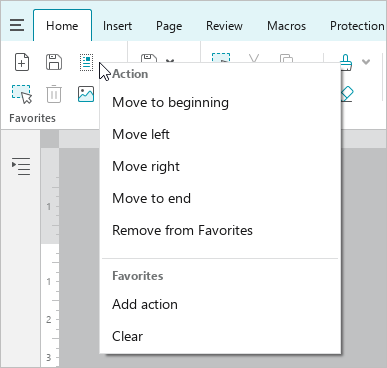
To change the position of an element in the Favorites group, follow these steps:
1.Right-click the item to open the context menu.
2.In the context menu, select the desired command:
•Move to beginning: Make the selected element the first in the group.
•Move left: Swap the selected and previous element.
•Move right: Swap the selected and subsequent element.
•Move to end: Make the selected element the last in the group.
Share:
Was this helpful?
Yes
No
Благодарим вас за обратную связь! Вы помогаете нам стать лучше.
Уточните, почему вам понравился материал:
Уточните, почему вам не понравился материал:
