How can we help you?
Non-printable characters
Product:
Application:
Non-printable characters are the formatting marks that help organizing the content of a document but are not displayed when printing. They are useful when editing a document to remove mistakenly added formatting marks, such as double spaces in the text.
To enable the display of non-printable characters:
•In the Command menu, click View > Non-Printable Characters.
•On the Toolbar, select the Paragraph section and click  Non-Printable Characters.
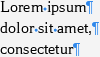
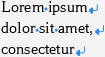
MyOffice Text displays the following non-printable characters:
Example of character in text |
Description |
|---|---|
|
Space |
|
Paragraph mark |
|
Tab |
|
Line break |
|
|
|
|
|
Anchor: •The table for which you have configured text wrapping |
|






Was this helpful?
Yes
No
