How can we help you?
Create a new task list
- About
- Getting started
- Interface overview
- Work with emails
- View the email
- Open an email in a new tab
- Select emails in a folder
- Mark an email as read or unread
- Move an email
- Delete an email
- Mark an email as spam
- Download emails
- Find an email in a folder
- Flag an email
- Reply to an email
- Reply
- Quick response
- Reply to all
- Reply to the event invitation email
- Reply and suggest new event time
- Forward
- Assign tags
- Print an email
- Download an email in EML format
- Create an event from an email
- Create a filter from an email
- View message headers
- Recall an email
- Resend an email
- View and download attachments
- New email
- Create a new email
- Specify the sender
- Specify the recipient
- Specify recipients for copy and blind copy
- Specify email subject
- Keyboard shortcuts
- Format the text of the email
- Add attachments
- New email priority
- Indicate new email sensitivity
- Request reading receipt
- Select sender's name and signature
- Save an email
- Calendar
- Work with calendars
- View the calendar
- Navigate through Calendar workspace
- Indication of events in the workspace
- Change the scale of the workspace time grid
- List of calendars
- Enable or disable calendars
- Change the calendar order in the Navigation bar
- Find an event in the calendar
- Create a new calendar
- Import a calendar
- Edit a calendar
- Set the default calendar
- Provide access to own calendar
- Get a link to the calendar
- Export a сalendar
- Delete a calendar
- Connect or disable an available calendar
- Work with events
- View event information
- Accept or decline an invitation to an event
- Send an email to all event participants
- Recommend an event participant or resource
- Suggest a new event time
- Copy the list of event attendees
- Create a new event
- Select a calendar
- Define the event theme
- Select the event date and time
- Details
- Add the attendees
- Select resources
- Add a video conference
- Event description
- Attach files
- Set up reminders
- Scheduler
- Change the composition of attendees
- Add resources
- Change the event time
- Select the time for the event
- More options
- Complete event creation
- Edit an event
- Create an event based on an existing one
- Cancel the event
- Accept or reject the event change proposal
- Join a video conference
- Work with tasks
- View task lists
- Create a new task list
- Change task list settings
- Delete a task list
- Create a new task
- Decline access to someone else's task list
- View and edit task
- Mark the completed task
- Delete a task
- Contacts
- Work with contacts
- View a contact
- Select a contact or group
- Create a new contact
- Edit a contact
- Find a contact
- Delete a contact
- Write an email to a contact
- Create a meeting with a contact
- Import contacts
- Export contacts
- Forward a contact
- Merge contacts
- Work with contact groups
- View group information
- Copy the list of group members
- Create a new group
- Add contacts to the group
- Delete contacts from group
- Write an email to the group
- Create a meeting with the group
- Forward group contacts
- Export a group
- Delete a group
- Work with resources
- Settings
Product: MyOffice Professional
Application: Mail Web version
1.At the top of the Taskbar, click  and select the command Create a new list. The task list creation pane will open:
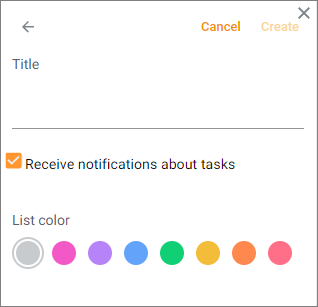
2.Specify the list parameters:
•Title: Enter the name of the new list.
•Color: Select a color to label the new list.
3.Click Create. The created task list will be added to Taskbar.
To interrupt the creation of the list, click  or Cancel.
Share:
Was this helpful?
Yes
No
Благодарим вас за обратную связь! Вы помогаете нам стать лучше.
Уточните, почему вам понравился материал:
Уточните, почему вам не понравился материал:
