Select sender's name and signature
When the administrator creates an account, a profile is automatically created in the account settings that contains the user's first and last name, as well as an empty signature under the email. This profile is used by default for signing emails. You can add a new profile to your account, set it as the default profile, or select it for individual emails.
To select a signature when creating an email:
1.Click the Profile button at the bottom of the New message form :
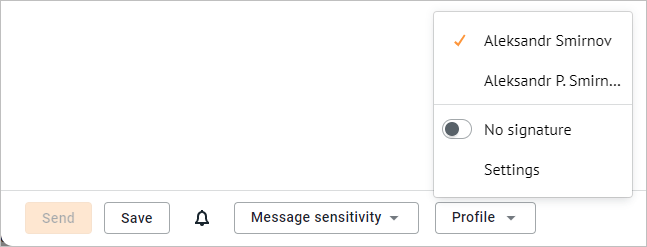
2.Select the desired value from the drop-down list. All signatures created for the selected sender of the message are listed at the top of the list. The following commands are located at the bottom of the list:
•No signature: Send an email without signature.
•Settings: Go to the Personal information settings block and add and/or edit existing signatures.
