How can we help you?
Request reading receipt
Product:
Application:
To find out that the sent email has been read by the recipient, you can include a request for reading in the email.
To receive confirmation of reading from the recipients of the message, click the  button at the bottom of the New message window.
The recipient's mail system is required to support this functionality in order to receive confirmation that the email has been read.
If the sender of the email has requested confirmation of reading, when opening the email, the recipients will receive a notification:
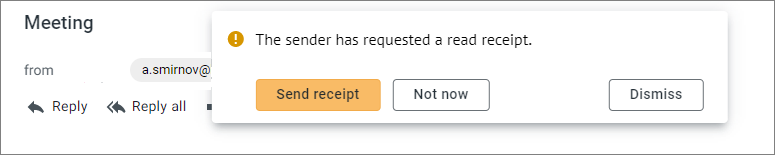
To close the notification, the recipient should click one of the buttons:
–Send receipt: A confirmation message will be sent to the sender of the message.
–Not now: The sender will not receive a read receipt but the next time the email is opened, the recipient will see the notification again.
–Dismiss: A read receipt will not be sent to the sender.
Was this helpful?
Yes
No
