List of contacts
The List of contacts contains:
–Toolbar
–Address book contacts snippet, which is selected in the Navigation bar (active address book)
–Buttons for navigating through the pages of the List of contacts
Toolbar
The following elements are located on the Toolbar:
–Name of the active address book

– : The button to open additional data entry fields to search for contacts
If there are selected emails in the List of emails, their number is displayed in the pane and tools for working with selected contacts appear:
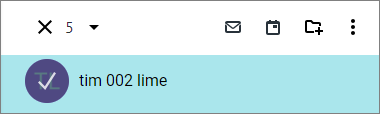
The Toolbar for working with selected contacts contains the following buttons:
– : Cancel selection button.
–The counter of selected contacts; the  button to the right of the counter opens a menu with the command to select all contacts in the active address book.
– : The button allows to write an email to selected contacts or write an email to groups of contacts.
– : The button allows to create a meeting with an invitation to selected contacts or create a meeting with contacts belonging to a group.
– : The button allows to add selected contacts to the group (not available for Distribution groups and My groups address books).
– : A button to open an additional menu with the commands: Export and Send as attachment (not available for the My groups address book).
Contacts snippets
The contacts in the list are sorted alphabetically by email addresses. Contacts that do not have an email address are at the end of the List of contacts. Each snippet displays:
–Name and email address of the contact or group
Navigation buttons
If there are a large number of contacts, the list is automatically divided into pages. On each page, the number of contacts specified in the settings is displayed.
Buttons for navigating through the pages are displayed at the bottom of the email list  .
.
Clicking the  button opens the next page of the list,
  opens the previous page. Clicking the
  button opens the last page of the list,
  opens the first page. The buttons appear when there are more than 5 email pages.
