How can we help you?
Create a new group
Product:
Application:
1.On the Navigation bar, select New contact and in the opened menu select Create new group. The New group window will open.
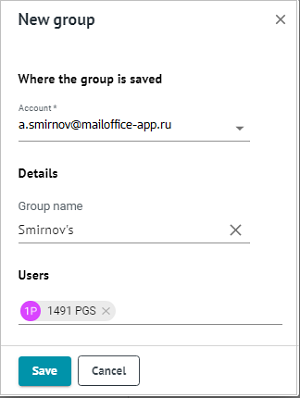
2.If you have added accounts, in the Group location menu select the account for which the group will be created. The list will only include MyOffice accounts (access to contacts of added external accounts is not available).
3.Enter the Group name.
4.In the Users field, specify the group participants. You can insert a list of addresses that was copied to the clipboard when viewing the email, events or Contact groups.
5.Сlick Save. The created the group will appear on the Navigation bar in the My groups address book.
Was this helpful?
Yes
No
