Add contacts to the group
You can only add contacts to the group created by you.
To add contacts to a group, do the following:
1.Open the address book containing the contacts you want to add to the group.
2.Choose one or more contacts in the List of contacts by clicking on their avatars.
3.Click  on the Toolbar of the List of contacts. The Add to another group window will open. In the Users field, the contacts you have selected will be indicated.
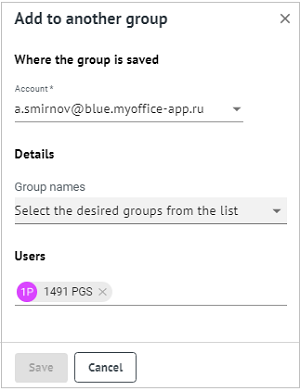
4.Without changing the account in the Group location field, select the groups to which you need to add the contact from the Group names list.
5.If necessary, add other contacts in the Users field.
6.Click Save. A message will appear indicating successful addition of contacts to the specified groups.
To add a contact opened in the Reading pane to the group, do the following:
1. On the Toolbar of the Reading pane, click  More > Add to group. The window Add to another group will open.
2. Perform steps 4–6 from the list above.
To add contacts from one group to another, do the following:
1.Go to the My groups section.
2.In the List of contacts, select the group the contacts of which need to be added to another group. The information about the group will be displayed in the Reading pane.
3.On the Toolbar of the Reading pane click More > Add to group. The window Add to another group will open.
4.Perform steps 4–6 from the list above.
