How can we help you?
Select a contact or group
Product:
Application:
Selecting contacts or groups of contacts is used to specify one or more elements with which you want to perform some action, such as writing an email to these contacts or creating an event involving them.
To select a contact or group in the active (that is, selected in the Navigation bar) address book, left-click on the avatar in the snippet in the List of contacts.
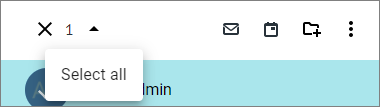
To select all contacts or all groups on an open page of the active address book, do the following
1.Click on an avatar in one of the contact snippets in the List of contacts.
2.From the drop-down list on the Toolbar, select Select all :
Was this helpful?
Yes
No
