Import a calendar
To import (upload) an external calendar saved in ICS format, do the following:
1.On the Navigation bar, click the button  to the right of the My calendars block name.
2.In the menu that opens, select Import to open the Import calendar.
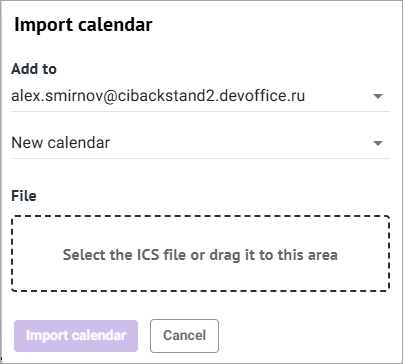
3.In the Add to fields:
•To upload data to a new calendar: select an account in the upper drop-down list, and leave the default value New calendar in the lower one.
•To upload data to an existing calendar: select the name of the calendar in the lower drop-down list to which you want to import the external calendar data. The account that owns the selected calendar will be inserted into the upper field automatically.
4.Left-click in the File field, in the standard system window that opens, specify the file with the external calendar in ICS format and click Open, or drag the ISC file into the dotted area.
5.Click the Import calendar button.
The external calendar will be uploaded, and the events that were in the user's calendar before uploading will be saved.
