How can we help you?
- General information
- Installation and launch
- Interface overview
- Screen elements
- Command menu
- Main menu
- Toolbar
- Change the display mode
- Hide or display tool group titles
- Hide or display the content of tool groups
- Customize the composition of the Favorites group of tools
- Hide or display the Favorites group
- Quick actions pane
- Slide bar
- Workspace
- Sidebar
- Status bar
- Language
- Theme
- Files
- New file
- Open a file
- Recent files
- Preview and print
- Save a file
- Autorecovery of documents
- Close a file
- Slides
- Zoom
- Switch between slide thumbnails
- Slide numbers
- New slide
- Duplicate a slide
- Change slide layout
- Move a slide
- Hide or unhide a slide
- Slide background fill
- Fill slide with color
- Choose a color from the color sets provided
- Specify the color code manually
- Copy the color with an eyedropper
- Fill slide with image
- Remove the fill color
- Delete a slide
- Text
- Enter text
- Non-printable characters
- Font
- Font size
- Text formatting
- Text color
- Choose a color from the color sets provided
- Specify the color code manually
- Copy the color with an eyedropper
- Highlight color
- Alignment and spacing
- Horizontal alignment
- Vertical alignment
- Line spacing
- Character spacing
- Paragraph spacing and indents
- Rotate text
- Lists
- Create a list
- Change the list style
- Set the start number of the numbered list
- Change the bullet format
- Format a number or bullet character
- Customize indents
- Change the nesting level
- Copy and paste a list
- Convert a list to text
- Links
- Insert a link to a web page or email address
- Insert a link to a file
- Insert a link to the slide
- Quick link insertion
- Follow the link
- Copy a link
- Edit a link
- Delete a link
- Keyboard shortcuts
- Special characters
- Spelling and grammar
- Correction of spelling mistakes
- Turn off the underline for spelling errors
- Add a word to the dictionary
- Import of third-party dictionaries
- Delete a word from the dictionary
- Delete text
- Images
- Insert an image
- Replace an image
- Image outline
- Select the color of the image outline
- Choose a color from the color sets provided
- Specify the color code manually
- Copy the color with an eyedropper
- Select the thickness and line type of the image outline
- Apply outline settings of the previous image or shape
- Remove image outline
- Resize an image
- Change image position on the slide
- Move an image
- Delete an image
- Shapes
- Insert a shape
- Fill a shape
- Fill a shape with color
- Choose a color from the color sets provided
- Specify the color code manually
- Copy the color with an eyedropper
- Fill a shape with image
- Remove the fill color
- Shape outline
- Select the color of the shape outline
- Choose a color from the color sets provided
- Specify the color code manually
- Copy the color with an eyedropper
- Select the thickness and line type of the shape outline
- Apply outline settings of the previous shape or image
- Remove shape outline
- Line style
- Select a line color
- Choose a color from the color sets provided
- Specify the color code manually
- Copy the color with an eyedropper
- Select the thickness and line type
- Apply the style of the previous line
- Remove line style
- Resize a shape
- Change line length and angle
- Select arrowhead type
- Change shape position
- Move a shape
- Delete a shape
- Tables
- Insert a table
- Insert rows
- Insert columns
- Edit table content
- Select cells
- Select a column or row
- Select a table
- Resize a column or row
- Specify exact size of cells
- Change table size
- Merge or unmerge cells
- Cell background color
- Add the fill color to table cells
- Choose a color from the color sets provided
- Specify the color code manually
- Copy the color with an eyedropper
- Fill cells with an image
- Remove the fill color
- Cell borders
- Change border parameters
- Choose a color from the color sets provided
- Specify the color code manually
- Copy the color with an eyedropper
- Apply the border style of the previous table
- Delete borders
- Change table position
- Move a table
- Delete rows or columns
- Delete a table
- Charts
- Work with several objects
- Select objects and groups of objects
- Group or ungroup objects
- Manage selected objects
- Manage grouped objects
- Delete a group of objects
- Alignment of objects
- Edit content
- Edit outside the slide
- Select all
- Undo and redo
- Clipboard
- Clear custom formatting
- Slide show
- Slide show modes
- Start a slide show
- Slide show Control bar
- Switch slides
- Advance slides automatically
- Display the Slide bar
- Select objects on the slide
- Transition effects
- Laser pointer
- Manage screens in the presenter view
- Pause slide show
- Stop slide show
- Cloud actions
- Log in
- Server connection indicator and server certificate
- Create a file or folder
- Open a file
- Save the file to the cloud
- Create a local copy
- Upload a file
- Download a file or folder
- Delete a file
- Restore a file or folder
- Shared access to files
- Revoke own access
- Log out
- Password protection
- Education pane
- Additional information
- Feedback
Application: Presentation Education
To remove an element from the Favorites group, right click it and run the Remove from Favorites command.
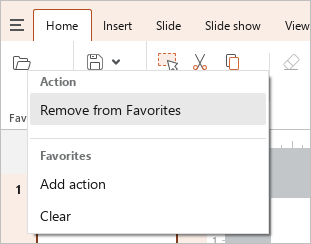
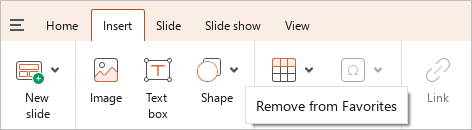
You can also follow the steps below to delete a button added from the Toolbar:
1.Right-click the button on the tab from which it is added.
2.Run the Remove from Favorites context menu command.
Share:
Was this helpful?
Yes
No
Благодарим вас за обратную связь! Вы помогаете нам стать лучше.
Уточните, почему вам понравился материал:
Уточните, почему вам не понравился материал:
