Connect online calendar
When you connect an online calendar, your calendar files may reside:
–On regular web servers, such as iCS (read-only) format
–On WebDAV and CalDAV servers
–On a local file system
–On a network share
To connect a network calendar to the application:
1.From the Main Menu, select File > New > Calendar. The Create New Calendar window opens.
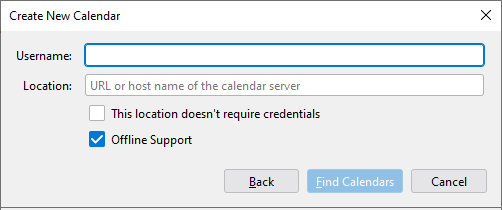
2.In the Create New Calendar window, select On the Network.
3.Enter a Username, such as your email address.
4.Enter the Location or network name of the calendar server.
5.If necessary, select the This location doesn't require credentials check box.
6.If necessary, select the Offline Support check box if you need to use your calendar when you are not connected to the network.
7.Click the Find Calendars and, if the address requires credentials, enter the user password. Calendars matching the entered address will be found.
8.In the Calendar Type list, select the calendars communication protocol.
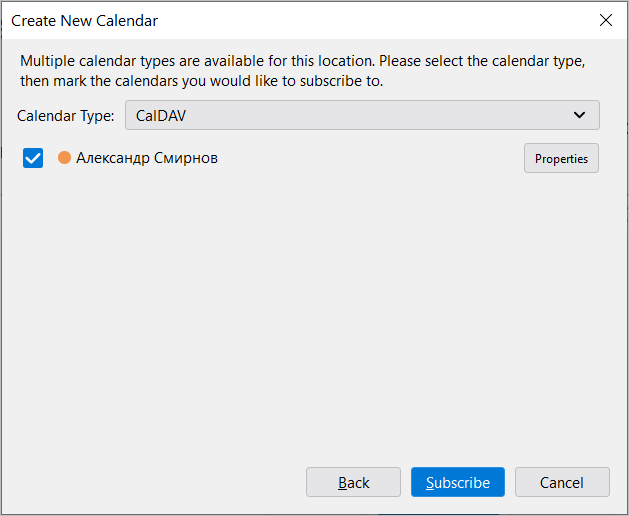
9.Select the check boxes in the rows of the required calendars.
10.Click the Subscribe button.
The calendars will be connected to the application.
If there are no calendars at the address you specified, the application may prompt you to create a new calendar on the server. This is only possible if the server supports creating calendars through third-party applications.
