Resize an image proportionally
To quickly resize an image while maintaining the proportions, do the following steps:
- Select the image you want to resize.
- Hold the left mouse button down and drag any of the corner handles of the frame until the image takes the desired size.
- Release the left mouse button to set the new image size.
To resize the image to the nearest millimeter, follow the steps below:
-
Select the image.
-
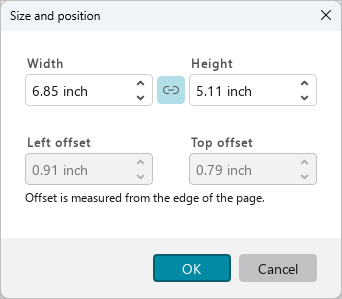
Open the Size and position window in one of the following ways:
- On the Home tab, in the Image group, click
 ** Size and position**.
 - Open the context menu by right-clicking and run the Size and position command.
- On the Home tab, in the Image group, click
-
In the Size and position window, in the Width and Height boxes, specify the required width and height of the image.
-
Click OK.