Create a pivot table based on the data in the current document
To create a pivot table using the data from the current document, follow these steps:
- Select one of the following elements required to create a pivot table:
- The range of data in the source table from which the pivot table should be created. The range of data should be selected with the column headings.
- A single cell within the data range, or an empty cell adjacent to the range if you want to use the entire range.
tip
The range cannot consist of one line. The first range line cannot contain empty or merged cells.
•The cell on the current sheet into which you want to insert the pivot table. This cell will become the upper left cell of the table. The selected cell should not contain any data.
warning
It is highly recommended to keep at least two empty rows above the pivot table. These lines are required for filters.
- Open the pivot table creation window by clicking the Insert
 Pivot table on the tab. In the menu that opens, select Use this file data.
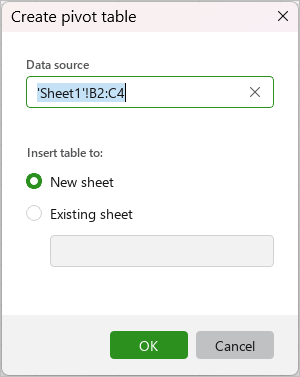
 - If you selected a cell to insert the pivot table in the first step, specify the range of source table data from which to create the pivot table in the Data source box. When you select a range of data with the mouse, a tooltip appears showing the dimensions of the selected area. The tooltip is displayed as long as the left mouse button remains held down.
-
If you selected a data range, a single cell within a range, or an adjacent blank cell in the first step, specify where to insert the table:
- New sheet: Insert the table in a new sheet. The new sheet will be created automatically. By default, the new sheet will be named Pivot table <No.>, where No. is the number of the pivot table in the document you are working on. If needed, you can edit the sheet name.
- Existing sheet: Insert the table on the sheet that is currently displayed on the screen. In the Specify a destination cell box, enter the cell address manually or click to select an empty cell in the workspace where you want the upper-left cell of the pivot table to be located. There should be at least two empty rows above the initial cells for filters.
-
Click OK.