Reference operators
Reference operators are used to describe references to cell ranges. You can reference cells on the current sheet as well as cells on other sheets.
| Arithmetic operator | Description | Example |
|---|---|---|
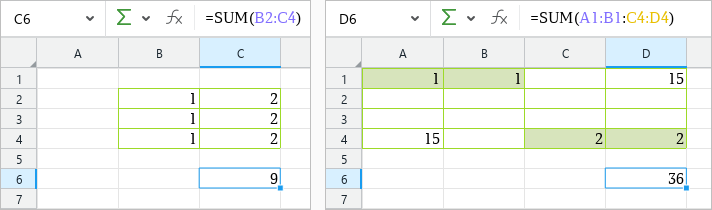
| : | Range operator Creates a reference to a range of cells. Placed between the first and last cells of the range Can be used to combine ranges of cells. In this case, it returns the range between the upper-left and lower-right cells, including those cells | =SUM(B2:C4) =SUM(A1:B1:C4:D4): The sum of all cells between A1 and D4, including those cells |
| Space | Intersection operator Creates a reference to the cells located at the intersection of the specified ranges | =SUM(A2:C4 B2:D4) |
| 'sheetname'! | Creates a reference to a cell or range of cells on another sheet in the current document | =SUM(B2+'Sheet2'!В2) =SUM(B2:C4+'Sheet2'!B2:C4) |
| 'sheetname n:sheetname m'! | Creates a reference to the same cell across multiple sheets in the current document (3D reference) | =SUM('January_2019:December_2019'!A1): The sum of the contents of cell A1 across all sheets in the specified range |
When entering formulas, select the desired range of cells so you don't have to enter it manually.
Range operators:
Intersection operators:

Reference to cells on another sheet:
