Automatic calculation of functions
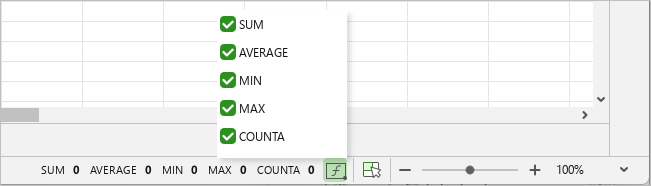
If the user selects a range of cells in the table, the application automatically calculates the values of the five most used functions for their contents. The calculated values are displayed on the Status bar:
- –SUM: Calculates the sum of all numbers in the selected range.
- –AVERAGE: Calculates the average value of all numbers in the selected range.
- –MIN: Displays the smallest value among all the numbers in the selected range.
- –MAX: Displays the highest value among all the numbers in the selected range.
- –COUNTA: Displays the number of values in the selected range. Numerical and text values are taken into account.
To configure the list of displayed functions, follow these steps:
- On the Status bar, click
 .
. - In the list that opens, select the checkboxes for the functions that should be displayed on the Status bar.