Font
By default, when you create a document in the MySpreadsheet application, the XO Thames font is used.
You can change the font in one of the following ways:
- Select from the list of most recently used fonts.
- Find by name.
- Select from the full list of fonts.
The list of recent fonts saves up to 5 fonts that you have selected recently. The list is unique for each application and is retained after you close it.
To select a font from the list of most recently used fonts, do the following:
-
Select the text for which you want to change the font:
- To change the font for all the text located in a cell, select this cell.
- To change the font for a text fragment located in a cell, switch to the cell editing mode and select this fragment.
- To change the font in one word, switch to the cell editing mode and place the cursor on this word or select it entirely.
-
On the Home tab, in the Font group, click the button to the right of the name of the current font.

- Select a font in the Recent fonts section using the mouse or keyboard keys:
- Left-click the font name.
- Select the font name using the keyboard keys
↓and↑and pressEnter.
To find a font by name, follow these steps:
- Select the text for which you want to change the font as described above.
- On the Home tab, in the Font group, click the field with the name of the current font and click the
 button.
 - Start typing the name of the desired font. The drop-down list will display a list of fonts that match the search criteria.
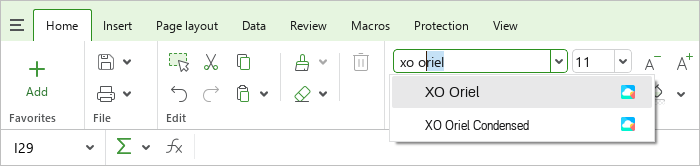
- Select the desired font using the mouse or keyboard keys:
- Left-click the font name.
- Select the font name using the keyboard keys ↓ and ↑ and press
Enter.
To select a font from the full list of fonts, follow these steps:
- Select the text for which you want to change the font as described above.
- On the Home tab, in the Font group, click the button to the right of the name of the current font.
- Select a font in the All fonts section using the mouse or keyboard keys:
- Left-click the font name.
- Select the font name using the keyboard keys
↓and↑and pressEnter.
It is recommended to use the fonts of the XO family in order to preserve the formatting of the document when it is opened in other operating systems.