Remove data validation
You can remove data validation in one of the following ways:
- Using the Data validation dialog box.
- Using the All validations pane.
- Delete columns or rows with cells with validation.
- Delete the sheet containing the cells with validation.
- Apply autofill for cells without validation to cells with validation.
To remove data validation using the Data validation window, follow these steps:
-
Select the cell or range of cells containing the validation.
-
Open the Data validation window in one of the following ways:
- On the Data tab, click
 Data validation.
 - On the Sidebar, click
 All validations and in the All validations pane that appears, click Add validation.
- On the Data tab, click
-
Click Clear all in the bottom of the dialog box. If you want to remove such validation from all cells, check the Apply to all cells with the same validation settings box.
-
Click Save.
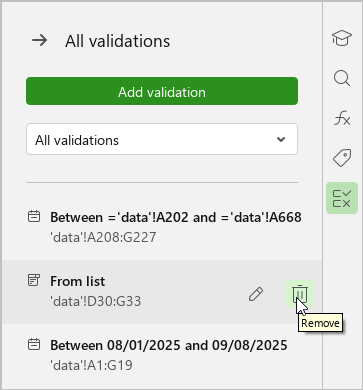
To remove data validation using the All validations pane, follow these steps:
- On the Sidebar, click All validations.
- In the opened list in the pane, find the validation. The cell with the selected validation will be highlighted on the sheet.
- Click
 Remove in the line with the validation and confirm the deletion in the dialog box that appears.