Paragraph spacing and indents
To customize spacing and indentation for paragraphs, follow the steps below:
-
Select the required text:
- To change the settings of a single paragraph, select that paragraph/part of that paragraph or place the cursor in it.
- To change the settings of multiple paragraphs, select these paragraphs entirely.
- To change the settings for all text within an object, select the object or select all text within the object.
-
On the Home tab, in the Paragraph group, click
 Paragraph settings.
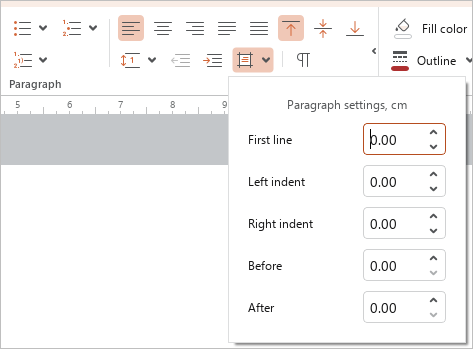
- In the window that appears, enter the required numeric values for the following parameters:
- First line: The distance from the left border of the object to the first line in the paragraph.
- Left indent: The distance from the left border of the object to the paragraph.
- Right indent: The distance from the right border of the object to the paragraph.
- Before: The spacing between the current paragraph and the previous paragraph.
- After: The spacing between the current paragraph and the next paragraph.
To quickly increase or decrease the paragraph indent by 1.25 cm, on the Home tab, in the Paragraph group, click  Increase indent or
  Decrease indent.