Character spacing
Character spacing allows you to set the spacing between the characters being entered into the text. You can choose between the following options: condensed, normal, and expanded character spacing.
To change the character spacing, do the following:
-
Select the text you want to customize the character spacing :
- To set the character spacing in a single word, place the cursor in the word or select the entire word.
- To set the character spacing in a piece of text, select the entire text.
- To set the character spacing for all text within an object , select the object or select all text within the object.
-
On the Home tab, in the Font group, click the
 button.
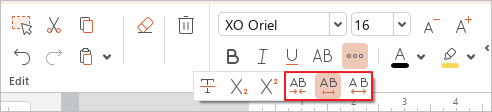
- Select the desired character spacing type:
 Condensed
 Normal
 Expanded