Send backward
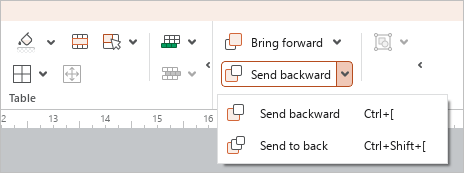
To move a table one level backward relative to another object, select as an object and do one of the following:
- On the Home tab, in the Arrange group, click
 Send backward or click the arrow to the right of the ** Send backward** button and run the Send backward command.
- Right-click the table to open the the context menu and select Send backward.
- Press
Ctrl+[in English keyboard layout.
To bring the table behind other objects, select it as an object and do one of the following:
- On the Home tab, in the Arrange group, click the arrow to the right of the ** Send backward** button and run the Send to back command.
- Right-click the table to open the the context menu and select Send to back.
- Press
Ctrl+Shift+[in English keyboard layout.