Move a slide
To make a slide the first or last slide in a presentation, drag it with the mouse on the Slide bar, or follow these steps:
- Select a slide on the Slide bar.
- Move the slide in one of the following ways:
- On the Slide tab, click
 Move slide and run the Move to beginning or Move to end command.
 - Right-click to open the slide context menu and run the Move to beginning or Move to end command.
- Press
Ctrl+Shift+↑to move the slide to the beginning. PressCtrl+Shift+↓to move the slide to the end.
- On the Slide tab, click
To swap the selected slide with the previous one, drag it with the mouse on the Slide bar, or do one of the following:
- On the Slide tab, click ** Move slide** and run the Move up command.
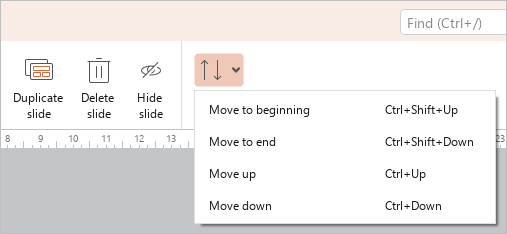
- Press
Ctrl+↑.
To swap the selected slide with the next one, drag it with the mouse on the Slide bar, or follow these steps:
- On the Slide tab, click ** Move slide** and run the Move down command.
- Press
Ctrl+↓