Normal view
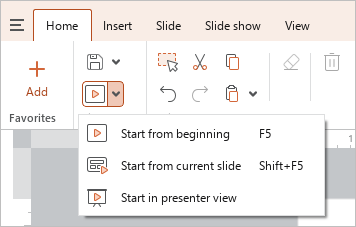
You can start the slide show from the first slide or from the current slide, provided that this slide is not hidden.
To start the slide show from the first slide, do one of the following:
- On the Home tab, in the File group, click
 Start from beginning or click the arrow to the right of the Start from beginning button and run the Start from beginning command.
- On the Slide show tab, click
 ** Start from beginning**.
 - Select the first slide on the Slide bar by double-clicking.
- Press
F5.
tip
If the first slide is hidden, the slide show starts with the first unhidden slide.
To start the presentation from the current slide, do one of the following:
- On the Home tab, in the File group, click the arrow to the right of the Start from beginning button and run the Start from current slide command.
- On the Slide show tab, click
 ** Start from current slide**.
 - Select the current slide on the Slide bar by double-clicking.
- Press
Shift+F5.