Revoke own access
Users of the cloud can share files with other users.
Once the access to a file is provided, it will be displayed under the Shared section of the cloud. If you don't want to have access to a file, the file will be deleted from the list.
To revoke your own access to a file, follow these steps:
-
Open the explorer of the cloud in one of the following ways:
- Click the
 button and run the Open from cloud command from the main menu.
 - Press
Ctrl+Shift+O.
- Click the
-
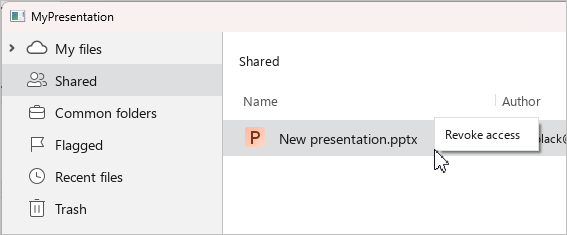
In the cloud storage explorer, select the Shared section.
-
To revoke your own access to a file, follow these steps:
- Right-click to select the file and click Revoke access.
- Left-click to select the file and press
Delete.
- In the Revoke access dialog box, click OK.